Clamp-On Gooseneck Tablet & Phone Holder for Bed or Desk
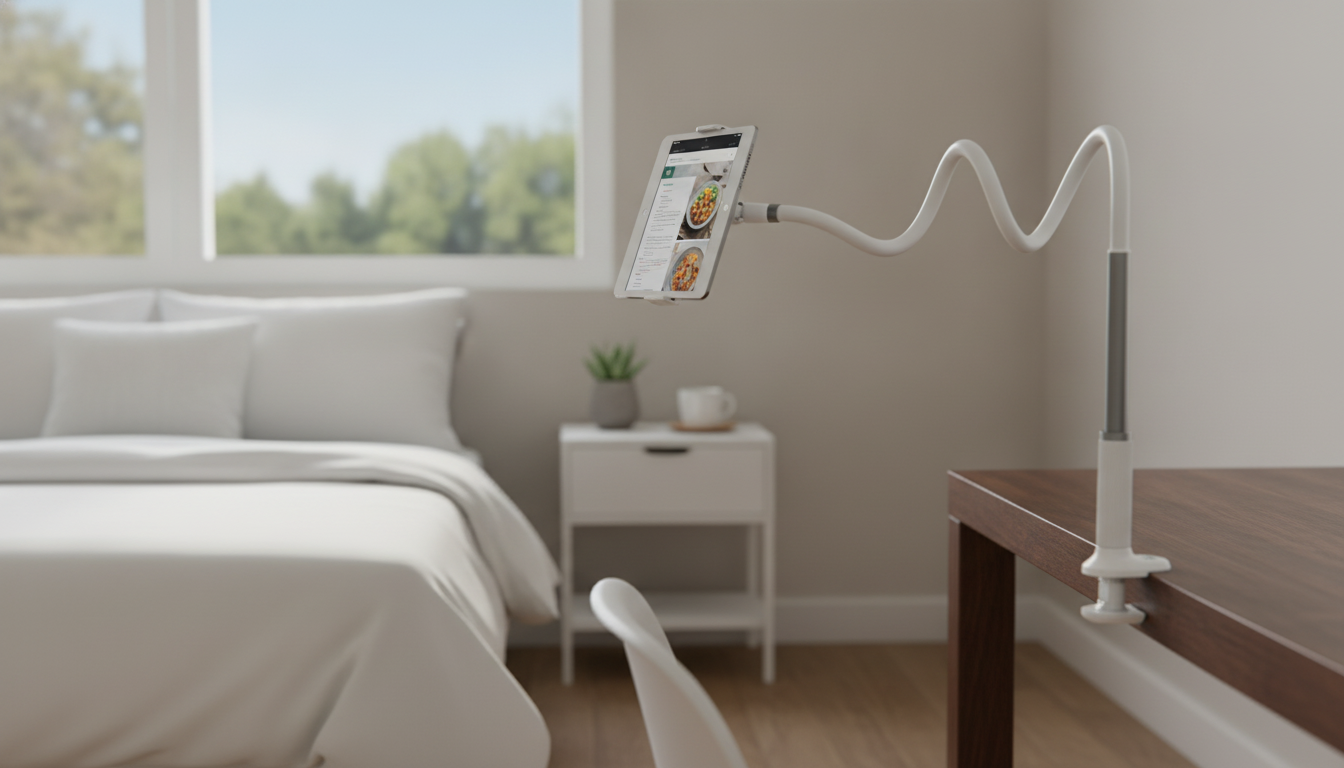
Flexible Gooseneck Tablet & Phone Holder with Clamp for Bed and Desk
A clamp-on gooseneck holder keeps a phone or tablet comfortably in view while freeing up hands for reading, watching, video calls, or following recipes. The right setup helps reduce strain, keeps your device safer than balancing it on pillows, and makes daily use feel effortless—whether you’re reclining in bed or working at a desk.
What This Holder Solves
A gooseneck holder is one of those small upgrades that quietly improves a lot of routines.
- Reduces arm and wrist fatigue during long viewing sessions in bed or at a workstation
- Creates a consistent eye-line for video calls, streaming, and scrolling without constantly repositioning the device
- Keeps devices off pillows, blankets, and cluttered desks where they can overheat, slip, or get knocked over
- Supports hands-free accessibility for users who prefer minimal gripping or tapping
Key Parts and Features to Notice
Not all clamp mounts feel the same day-to-day. These details make the difference between “sets and forgets” and “constantly fiddling.”
- Clamp base: Look for a firm grip and padding to help prevent scuffs on wood, metal, or painted surfaces.
- Flexible gooseneck arm: A good arm holds its position after bending without “spring-back” or slow drifting over time.
- Device cradle: Side grips should feel secure, and the back plate should minimize wobble when tapping.
- Rotation and tilt: Quick portrait/landscape swaps and easy angle changes help reduce glare and improve comfort.
- Cable access: Make sure you can plug in a charger while mounted—especially for long bedside sessions.
Bed vs Desk Setup: Practical Differences
| Use case | Best clamp location | Arm position tip | Comfort goal |
|---|---|---|---|
| Bedside viewing | Bed frame, headboard, nightstand edge | Arc the arm from the side to center the screen | Screen at eye level while reclining |
| Desk work/calls | Back edge of desk or shelf above | Keep bends minimal and closer to the clamp for stiffness | Screen slightly below eye level to reduce neck strain |
| Kitchen/recipes | Counter lip or sturdy shelf | Raise the device away from splashes; keep cable routed back | Readable screen without occupying counter space |
| Reading/comics | Headboard or side table | Bring device closer; use tilt to cut glare | Comfortable distance without hand-holding |
How to Clamp It Securely (Without Damaging Furniture)
- Choose a rigid surface: Solid wood, metal frames, and thick desks hold better than thin particleboard edges.
- Clean the clamp area first: Dust and oils reduce pad grip and can lead to slow slipping over time.
- Tighten until snug: Then add a small extra turn—avoid overtightening that can mar softer materials.
- Protect delicate finishes: Add a thin layer (felt or microfiber) between clamp and furniture if needed.
- Test before mounting: Give the arm a gentle shake; if anything rocks, re-seat the clamp.
Positioning for Bed: Comfortable Viewing Without Neck Strain
For lounging, comfort comes from a neutral neck angle and a stable, predictable device position.
- Aim the screen so the top is near eye level when reclining; avoid looking sharply down toward your lap.
- Keep the device centered to reduce twisting—mount from the side and bend the arm inward.
- Adjust viewing distance: closer for small text, farther for movies to reduce eye fatigue.
- Avoid placing the device directly above your face; offset it slightly to reduce risk if the mount shifts.
- Route the charging cable along the arm and away from bedding where it could snag.
For additional posture guidance, workplace ergonomics principles still apply at home—keeping screens at a comfortable height can help reduce strain over longer sessions (see Mayo Clinic: Office ergonomics).
Positioning for Desk: Stable for Tapping, Typing, and Video Calls
For screen height and posture basics, OSHA’s workstation guidance is a helpful reference point when dialing in a desk setup (OSHA Computer Workstations eTool).
Stability, Safety, and Device Care
Heat management is especially important during charging; device makers recommend keeping devices within acceptable operating temperatures (Apple Support: operating temperatures).
Compatibility and Fit Checks Before Buying
Best Uses: When a Gooseneck Holder Shines
Product Spotlight
If you want a simple, everyday mount that works across multiple rooms, the Flexible Gooseneck Tablet & Phone Holder with Clamp for Bed and Desk is designed for flexible positioning and hands-free viewing. Its clamp-on format makes it easy to attach to desks, headboards, and nightstands, while the gooseneck arm helps you shape the viewing angle for bed or desk use.
To keep your setup feeling clean and grit-free (especially around clamp pads and desk edges), pairing it with a quick daily tidy can help. A lightweight option like the Cordless Vacuum Cleaner, 235W Brushless Motor, 40Min Runtime can make it easier to pick up dust around workstations and nightstands so clamp surfaces stay grippy and stable.
FAQ
Will a gooseneck holder wobble when tapping the screen?
Some movement is normal, especially with longer reach. Reduce wobble by shortening the arm, using fewer bends, clamping to a thicker surface, and tapping more lightly (or using a stylus when practical).
Where is the safest place to clamp it for bedside use?
A rigid headboard/bed frame or a sturdy nightstand edge is typically safest. Avoid flimsy rails, keep the device offset rather than directly above your face, and route charging cables so they won’t snag in bedding.
Can it be used with a tablet in a protective case?
Yes if the cradle opens wide enough to accommodate the tablet plus the case. Measure the full width/thickness with the case on and confirm the cradle grips securely without blocking buttons or the charging port.








Leave a comment